Square Team
- 4.8
- Rating
- 1.00M
- Installs
- Free
- Price

 Analysis by App-foxy
Square Team is a finance app from Block, Inc. designed for people who work with a Square-powered business and need a practical way to stay connected while away from a counter, office, or computer. I approached it less like a general banking tool and more like a work companion: a place for team communication, schedule awareness, and access to earnings. That distinction matters, because its usefulness depends heavily on your relationship with a Square workplace.
My first impression was that the app has a clear job. It is not trying to replace every financial app on your phone. Instead, it brings several everyday work tasks into one mobile space, which can be especially helpful when your shifts change, messages arrive outside a desktop workflow, or you want to keep an eye on money connected with your work. The experience is free, available for everyone, and has reached over a million installs, so it has a meaningful audience beyond a small pilot product.
The app was released on October 19, 2018, and the current version is 7.22. It supports devices running iOS 9 or later, which gives it a broad compatibility range. Its average rating is 4.8 from around 8,500 ratings, with roughly 1,600 written reviews. Those figures suggest that many users find the core idea dependable, although a high rating should not be confused with universal suitability. A staff member at a Square-based business may find it immediately relevant, while someone with no connection to that ecosystem has little reason to keep it installed.
You May Also Like

 Blood Strike: 2.5 Anniversary
Blood Strike’s Loadouts Turn Every Drop Into a Tactical Gamble
A close look at Blood Strike’s custom loadouts: how fast access to signature weapons reshapes its battle royale rhythm, rewards preparation, and narrows the gap between fights.

 Pandora - Music & Podcasts
Pandora’s Music Is Easy to Start, but Harder to Recover
Pandora’s strength is its low-effort path from a seed to a station. Its weak spot is how much confidence it asks you to place in connection, setup, and quiet recovery.

 8 Ball Pool
 Is Built on Rivalries, Rematches, and Routine
A close look at the rivalries, rematches, shared routines, and unanswered safety questions that turn a quick pool match into a persistent mobile community.

 Samsung Music
’s Quiet Strength Is Playing What You Already Own
Its reach comes less from spectacle than from dependable access to a personal library. That simplicity is both the app’s strongest retention engine and its ceiling.

 AccuWeather: Weather Radar
AccuWeather Review: A Quick, Clear Forecast for Everyday Decisions
For everyday plans, the best forecast is the one you can understand quickly. AccuWeather makes rain timing, radar, and local conditions easy to act on, with a few trade-offs.

 Hill Climb Racing
Why Hill Climb Racing Still Turns Crashes Into One More Run
A tiny car, a bumpy hill and one more upgrade: Hill Climb Racing keeps resurfacing because its simple chaos makes every near-miss feel personal.
More From Our News Desk



How Square Team Holds Up Beyond the First Week
After the first week, I’d judge Square Team less by how quickly I can find its main areas and more by whether it fits the way my workplace actually communicates. A useful next step is to agree with coworkers on which updates belong in the app and which need a direct conversation, so important messages don’t get lost among duplicate channels. That everyday discipline also makes it easier to assess how well the app serves people with different needs and routines.
The first-week appeal is practical rather than flashy
During an initial week, the strongest quality is convenience. Having work communication, schedule information, and earnings access together reduces the need to remember several separate routines. I like that the app focuses on the moments that tend to interrupt a working day: checking when I am expected, seeing whether a message needs attention, or reviewing money connected with completed work. These are small actions, but they happen often enough that reducing friction can make a noticeable difference.
The communication side is particularly useful for teams that do not want every update to depend on a group chat or a paper notice near the register. Keeping work-related conversation in the same environment as scheduling gives those messages more context. A change to availability or a shift-related note is easier to understand when it sits beside the work information it concerns. I would still avoid treating any mobile workplace channel as a substitute for clear management, but the app can make routine coordination less scattered.
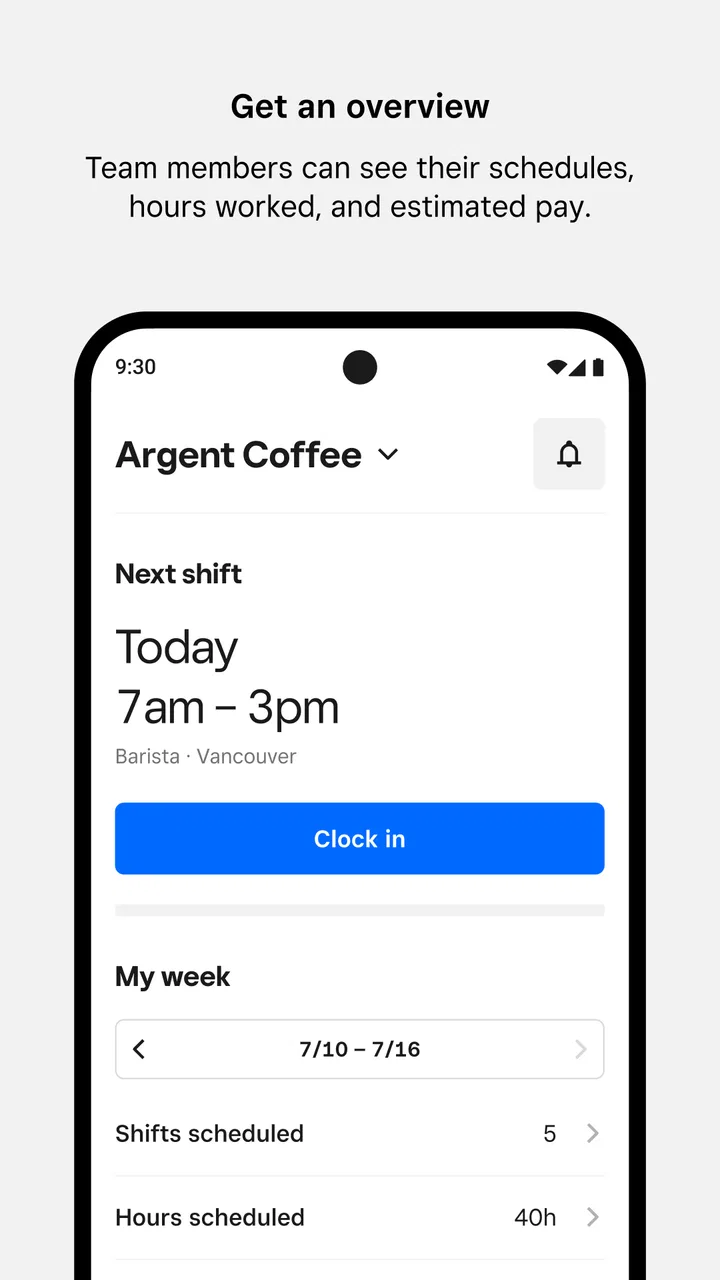
Schedule access is another reason the first week can feel productive. Instead of waiting until a shift board is physically visible or opening a separate system on a computer, a worker can check the information while already using a phone. That is valuable for people with changing hours, multiple responsibilities, or commutes that require planning. The benefit is not that the schedule becomes more sophisticated; it is that it becomes easier to consult at the moment a decision has to be made.
The earnings area gives the app a more tangible purpose than a simple messaging tool. When I use a workplace app, I want some connection between the time I spend working and the information that helps me understand what I have earned. Square Team brings that access into the same place as communication and schedules. For a worker who checks earnings regularly, this can create a straightforward habit: review upcoming work, read important updates, then look at the financial side without changing apps.
A realistic everyday scenario explains the appeal better than a feature list. Imagine finishing a shift and heading home while wondering whether tomorrow’s start time changed. You open the app, check the schedule, read a workplace message, and review the earnings information available to you. None of those actions is remarkable alone, but completing them in one familiar place is the sort of repeated convenience that can justify an installation. The value comes from the workflow, not from any single screen.
Who benefits most from keeping it installed
Square Team is best suited to employees whose workplace already uses Square-related tools and expects staff to interact with this app. In that situation, the app can become part of a normal work rhythm rather than another optional download. It is also a sensible fit for people who prefer checking work details on a phone instead of relying on a shared computer, printed schedule, or separate conversations.
It is less compelling for someone who only wants a personal budgeting app, a conventional bank account, or a broad payroll tracker. The finance label may attract users looking for general money management, but this is a work-centered product. I would not install it expecting bill planning, investment tools, spending categories, or the wider controls found in dedicated personal-finance services. Its focus is narrower, and that narrowness is both its strength and its main boundary.
Managers and owners should also think about the employee experience rather than assuming that a centralized app solves communication by itself. A team can have a convenient channel and still suffer from unclear messages, late schedule changes, or inconsistent habits. Square Team helps deliver information, but people still need to use it consistently. If a workplace continues posting updates in several unrelated places, the app may become another inbox instead of the single useful routine it could be.
Month-to-month value depends on recurring habits
After the novelty fades, the app earns space through repetition. The most durable pattern is a short check before work and another review after work. Before a shift, I would use it to confirm timing and catch team communication. Afterward, I would use it to revisit earnings information or look for anything that affects the next workday. This is a modest habit, but it is realistic because every step relates to an existing responsibility.
The schedule function is likely to provide the most consistent long-term reason to return. A finance feature may be checked occasionally, while work times can change from week to week. If the app reliably reflects the schedule a workplace maintains, opening it becomes part of planning meals, transportation, childcare, study time, or a second job. That practical connection gives it more staying power than an app that offers information only when a user remembers to seek it.
Communication adds recurring value when it replaces uncertainty. A message about a shift, a workplace reminder, or a team update can prevent a needless phone call or a trip to check a notice in person. The important trade-off is that this benefit increases with team adoption. If only a few people use the channel, it will not become the dependable place everyone checks. The app’s long-term usefulness is therefore partly social: it works best when the workplace makes it part of the normal process.
Earnings access can support a useful review habit, but I would keep expectations measured. Seeing work-related earnings information is not the same as having a complete personal financial picture. I would still use a separate banking or budgeting tool for broader decisions, such as planning monthly expenses or comparing income from different sources. Square Team can help me stay informed about one work relationship without becoming the only place I manage money.
One non-obvious advantage is the way these areas reinforce each other. A schedule tells me when I am working, communication explains changes or context, and earnings information gives the work a financial reference point. Using them together can make discrepancies easier to notice. If a shift appears differently from what I remember, or if a payment-related detail does not match my expectations, I have a clearer starting point for asking the right workplace question. That does not make the app an auditing system, but it can improve everyday awareness.
The maintenance burden is low, but not zero
Square Team does not demand the kind of daily setup associated with a complex finance platform. The maintenance burden is mainly behavioral: keeping notifications useful, checking the app often enough to avoid missing work information, and making sure the account remains connected to the correct workplace context. Those tasks are manageable, but they matter because an ignored work app loses value quickly.
Notifications deserve deliberate handling. If every update feels urgent, I am more likely to silence everything, including a genuinely important schedule message. If notifications are too restricted, I may miss information that affects a shift. My practical approach would be to allow relevant work alerts while avoiding the habit of opening the app for every minor interruption. The goal is a dependable check-in routine, not constant phone attention.
There is also a maintenance issue that comes from changing jobs or working in more than one place. A workplace app is most useful when its information is current and clearly associated with the right team. If my employment situation changes, I would review the app’s visible work context rather than assuming old information will remain useful. This is one reason I would not treat Square Team like a permanent personal-finance home. Its relevance follows the work relationship.
Updates can improve reliability, and the current version is 7.22, but updating alone does not guarantee a smooth experience in every workplace. The app’s usefulness still depends on how managers maintain schedules and how teams communicate. When information is entered late or changed without a clear message, the user experience can feel confusing even if the application itself is functioning normally.
For that reason, I see the app as low-maintenance for an employee but more demanding for the organization behind it. A business needs a clear rule about where schedules are published, where updates are sent, and how corrections are handled. Without that discipline, employees may continue checking multiple channels, which removes much of the convenience Square Team is supposed to provide.
Where fatigue can set in
The first source of fatigue is duplication. If a manager posts a shift change in Square Team, sends a separate text, and leaves a paper note, users may feel safer checking everything, but they also learn that no single source is fully trustworthy. Over time, that turns a simple app into another place to monitor. The product cannot solve inconsistent workplace habits on its own.
A second source is the boundary between work information and personal time. Easy mobile access is helpful when I need to check tomorrow’s shift, but it can also make work feel permanently present. I would recommend using it intentionally rather than browsing it whenever a notification appears. For people who want a firm separation between work and home, a workplace communication app on a personal phone may be uncomfortable, even when the functions are useful.
Another limitation is specialization. Compared with a general banking app, Square Team is not designed to be a complete financial control center. Compared with a standalone calendar, its scheduling value is tied to work information rather than all personal appointments. Compared with a messaging service, its communication purpose is more focused on the workplace. I prefer that specialization to a cluttered all-in-one product, but users should choose it with the right expectations.
There can also be friction when a user wants a single combined view of life. Someone balancing several jobs, freelance income, and personal finances may still need a calendar, banking application, payroll records, and notes. Square Team can make one part of that picture easier to manage, but it will not automatically unify every source. In that case, a general productivity or finance solution may be better for the overall picture, while this app remains useful for the Square-specific workplace.
Privacy and attention are practical considerations too. I would be comfortable using it for work-related communication and earnings access when that is part of my job, but I would avoid expecting it to replace private financial planning. The more narrowly I define its role, the easier it is to decide which information belongs there and which belongs in a separate personal tool.
Three ways to get more value from it
First, I would make the schedule check a planning trigger rather than a passive glance. After looking at a shift, I would immediately consider transportation, meals, and any appointment that could conflict. This turns schedule access into a useful daily planning step. It also makes errors more visible early, when there is still time to ask for clarification.
Second, I would separate “information received” from “action required.” A team message may simply provide context, while another may require a response or a change to my plans. Treating every message identically creates fatigue. A quick mental distinction helps keep the communication area useful without allowing it to dominate the day.
Third, I would review earnings information at a consistent point rather than checking randomly. A regular review after work or at the end of a workweek can help me notice questions while the relevant shift is still easy to remember. This is more useful than opening the financial area repeatedly without a purpose, and it keeps Square Team in its proper role as a work-income reference rather than a full budgeting system.
A fourth insight is to use the app as a conversation starter when something looks unclear, not as proof that every detail is final. If a schedule or earnings item raises a question, I would compare it with my own memory and then ask the appropriate manager or workplace contact. The app can organize information, but human clarification remains important when workplace records and expectations do not line up.
Who should skip it
I would skip Square Team if I have no connection to a business using Square for team operations. Installing it out of curiosity is unlikely to create lasting value, because the recurring benefits depend on real workplace information. I would also look elsewhere if my main goal is personal budgeting, expense analysis, savings planning, or a complete view of several income sources.
A worker who strongly dislikes receiving job-related communication on a personal phone may prefer an employer-managed alternative, if one is available. Likewise, someone whose workplace already maintains a reliable calendar and communication system may gain little from adding another channel. The best app is not always the one with the most functions; it is the one that removes more work than it creates.
My long-term verdict
After the initial convenience wears off, Square Team remains worthwhile when it becomes the accepted daily bridge between a Square workplace and its staff. Its lasting value comes from a focused combination of communication, scheduling, and access to earnings. I appreciate that it does not need to pretend to be a complete bank or a universal productivity suite. For the right worker, that focus makes the app easier to understand and easier to build into a routine.
My recommendation is strongest for employees who regularly need to check work times, receive team information, and review earnings from a Square-connected job. The free price and Everyone age rating remove obvious barriers, while support for older operating systems makes it accessible to a wide range of devices. The high average rating and broad install base reinforce the impression that the core experience works well for many people, though the workplace context remains decisive.
I would not recommend keeping it simply because it is popular or because it carries a finance label. I would keep it if it saves me from checking scattered messages, makes schedule planning easier, and gives me a convenient recurring reason to review work-related earnings. If those tasks already happen smoothly elsewhere, the extra app may become background clutter.
In my view, Square Team earns lasting space when it becomes a trusted work habit, not just another notification source. For employees inside the Square ecosystem, that can be a meaningful improvement to an ordinary workday. For everyone else, a general finance, calendar, or communication tool will usually be the better choice. The app is focused, useful, and easy to justify when the workplace actually supports it; its long-term success depends less on novelty than on whether the team consistently makes it the place where important work information lives.
FAQs for Square Team
01What is Square Team, and what is it used for?
Square Team is a companion app designed for employees and team members of businesses that use Square’s point-of-sale and staff-management tools. Depending on the employer’s setup, it may let you view work schedules, clock in or out, request time off, communicate with coworkers, and review workplace information. Available features can vary, so the app’s usefulness depends on how your employer has configured Square services.
02Do I need an invitation or account from my employer to use Square Team?
Yes, in most cases you need to be connected to a business that uses Square for staff management. Employees typically sign in with an existing Square account or accept an invitation sent by their employer. Downloading the app alone does not provide access to schedules or workplace tools. If you cannot sign in, your manager or business administrator may need to confirm your email address, phone number, or employee profile.
03Can I use Square Team to view schedules, clock in, and request time off?
Square Team commonly includes employee features such as viewing upcoming shifts, checking availability, clocking in and out, and submitting time-off requests. However, these options are controlled by the business using Square and may not appear for every employee. Location permissions, device settings, and the employer’s account configuration can also affect time tracking, so you should verify the required setup with your manager.
04Is Square Team free to download and safe to use?
The app is generally free for employees to download, although the business may pay for the Square services that enable its staff features. Because the app can handle workplace schedules, time records, and account information, users should download it from an official app store and keep their login details private. Review requested permissions carefully and avoid sharing verification codes or passwords with anyone.
05What should I do if Square Team is not working or my information is missing?
If schedules, shifts, or time-tracking options are missing, first check that you are signed in to the correct Square account and that the app is updated. A stable internet connection and enabled notifications may also be necessary. If the problem continues, contact your employer because many access issues result from staff permissions or account configuration. For technical problems, use Square’s official support resources.
Pros
- Simple team messaging keeps workplace conversations organized.
- Useful for coordinating shifts
- tasks
- and daily team updates.
- Works well for small businesses and distributed teams.
- Mobile access helps staff stay connected away from a desk.
- Focused features make it easier to avoid unnecessary distractions.
Cons
- Some advanced collaboration tools may be missing for larger teams.
- Notification volume can become distracting without careful settings.
- Requires consistent staff adoption to keep information up to date.
- The interface may feel limited for complex project management.
- Account and workplace setup can take time for new team members.

Square Team
Gallery